Contact us
 Customer Area
 Visit LWS
Rate this article :
3.7/5 | 3 opinion
This article was useful to you ?
 Yes
Yes
 No
No
 Article read
32028 once
Article read
32028 once Merci ! N'hésitez pas à
poser des questions sur nos documentations si vous souhaitez plus d'informations et nous aider à les
améliorer.
Merci ! N'hésitez pas à
poser des questions sur nos documentations si vous souhaitez plus d'informations et nous aider à les
améliorer.Vous avez noté 0 étoile(s)



Sommaire
Procédure
This documentation explains how to change the contact email address associated with your LWS customer account from your customer area.
This email address is used to receive important information related to your account, such as certain notifications or security validations.
This procedure does not modify the mailboxes for your hosting, your domain name or your website.
LWS customer account
LWS Customer Centre / LWS Panel
Before making any changes, please make sure that you have the following information:
For security reasons, changes to the contact email address must be confirmed. A validation email is sent to the old and new email addresses to confirm the change.
This procedure is useful if, for example, you want to :
Go to your LWS / LWS Panel customer area and log in with your login details.
Once logged in :
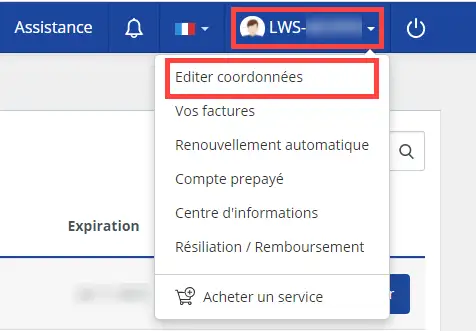
1. Click on the LWS ID for your account at the top right of the interface.
2. In the menu that appears, click on "Edit contact details".
In the form displayed, find the field corresponding to your contact email address.
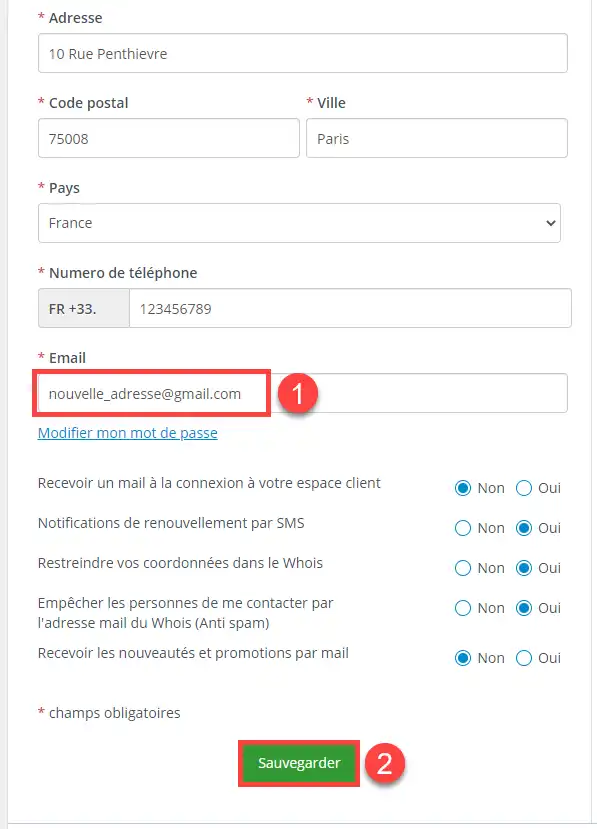
Tips before confirming Before confirming the change, take a few seconds to check : A simple error in the email address may prevent you from receiving the confirmation message.
After validation, a confirmation email is sent :
Open these messages and follow the instructions to confirm the change.
Once you have confirmed, your new email address will become the contact address associated with your LWS customer account.
This is the address that will be used for new communications related to your account.
To check that everything is correct
Important
The change may not be finalised until the requested email confirmation has been sent.
As a general rule, the change will take effect once the confirmation email has been validated.
Changing the contact email address of your LWS customer account does not change:
If you can no longer access your old email address, you will not be able to follow the standard confirmation procedure.
In this case, use the dedicated procedure provided by LWS to change the contact email address without access to the old address.
Check the following points:
If no message arrives and the situation persists, repeat the procedure with a correctly entered address.
If you can't log in, you won't be able to change your details from your account.
You must first recover access to your customer area before repeating the procedure.
This documentation does not apply to business email addresses or email addresses linked to a domain name.
It only concerns the contact email address for the LWS customer account.
If you want to change a mailbox on your hosting, you will need to follow the specific email management documentation.
You can change the contact email address for your LWS account directly from your LWS Customer Centre / LWS Panel via the "Edit contact details" section. The request must then be confirmed by email to be taken into account.
If you no longer have access to your old email address, LWS has set up a specific procedure to allow you to make the change despite this blocking.
Rate this article :
3.7/5 | 3 opinion
This article was useful to you ?
Yes
No
1mn reading
Modify customer account details
1mn reading
How do I check my identity?
0mn reading
Change the email address of my LWS account without access to the old address
0mn reading
How to view notifications in the customer area
Bonjour, merci de votre retour.
Dans votre situation, il vous sera nécessaire de nous contacter via la hotline téléphonique, afin que nous puissions vous aidez rapidement à retrouver l'accès à votre compte LWS.
Hotline Téléphonique
Du lundi au vendredi de 09H00 à 19H00.
France : 01 77 62 3003
International : +33 177 62 30 03
 About LWS :
LWS is a 100% French web hosting company that focuses on quality and innovation and offers a responsive and competent technical service at affordable prices.
About LWS :
LWS is a 100% French web hosting company that focuses on quality and innovation and offers a responsive and competent technical service at affordable prices.